Release notes
New requested features and debugging based on user feedback.
Features
3 new infill patterns:
· Honeycomb
· Triangle
· Cubic
These 3 new infill patterns are in addition to the previous Grid and Rectilinear patterns.
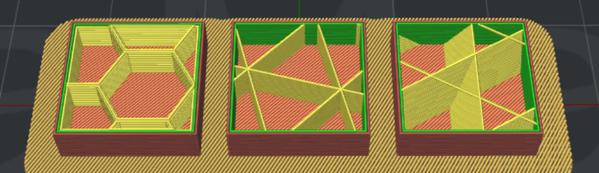
New infill patterns Honeycomb (left) Triangle (middle) Cubic (right)
New solid fill pattern:
· Concentric
The Concentric fill pattern is now available in addition to the existing two patterns; Lines and Rectilinear.
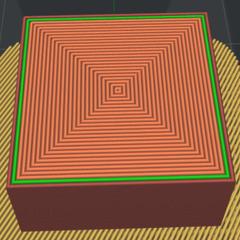
Concentric pattern for solid models
Improved layer printing order
New printing order:
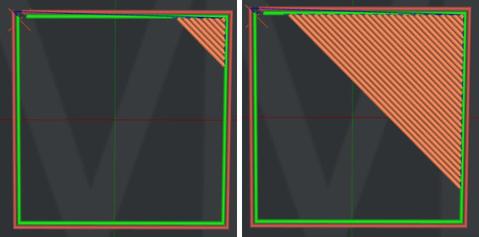
New layer printing order, originating from corner point
Previous printing order:
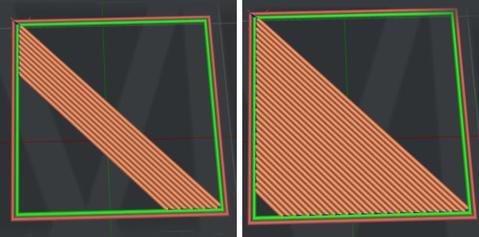
Previous layer order originating from center point
Acceleration and Jerk control
You can now enable and modify acceleration and jerk settings under:
Advanced Settings>Advanced
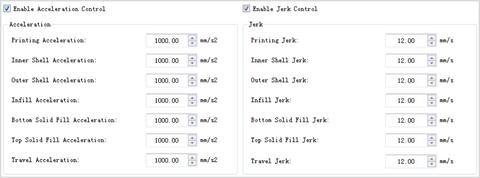
Added Coasting Distance
Replaces the final extrusion path to become a “travel only” movement with no extrusion. This will decrease excess material from “leaking” during nozzle travel.
This value can be defined under:
Advanced Settings>Extruder
Enlarged Pillar Size Range
Increased from 1-10mm to 1-100mm.
Movement arrow added for manual moving in X and Y directions
Prior versions only display an Z axis arrow with X and Y controlled by a free-motion “click and drag”.
Free-movement of the X and Y is still available by clicking and dragging the model without pressing the arrows.
Bug Fixes
Fixed Extruder Offset Settings not Taking Effect in Version 3.0.5.
Fixed the Edit button gray-out problem triggered after importing a new slicing template from Local Disk.
Prior versions required exiting and reopening.
Fixed “The heatup gcode is not added in the start gcode” prompt with proper gcode scripting.
Fixed the Bridging Calculation Error.
Bridging is now directionally aligned with the shell. Prior versions created odd angles that caused gaps in layers.
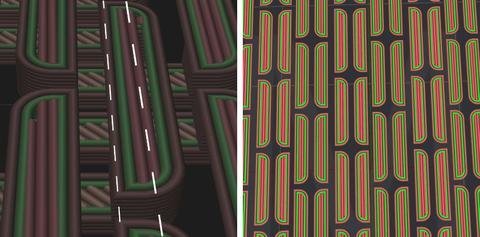
Askew layers angles with gaps (left), corrected bridging (right)
Fixed the Bug of Not Merging Circle Line for Brim.
Brim merged into vectorized circles as opposed to a series of lines resulting in smoother operation.
Fixed Top and Bottom Layers not Generating when Printing Multiple Individual Components.
Fixed Incomplete Supports Generation on Small Features
Moved the Temperature Tab into Cooling Tab
Fixed Preview Calculation with Solid Infill Top Layer Speed
Prior calculations only recognized top layers as opposed to top facing surfaces.
Fixed the Bug of Left and Right Extruder Estimated Filament Amount
Past filament calculation was combining left and right values to provide total estimated amount.
Optimized the Nozzle Moving Path after Nozzle Purging
Fixed the Bug of OBJ File NOT be Parsed Correctly
Recognizing non-triangle surfaces.